Connect clients to eligible vaults
Coordinate approved client access, positions, and redemption requests. Track channel activity and fee entitlements while the asset manager operates the source vault.

Operate the channel. On agreed terms.

Build an approved channel.
Apply to the asset manager and deploy the supported distribution wrapper once your channel is approved.

Follow client capital.
Track deposits and redemption requests through the channel tied to your source vault and share class.

See your fee entitlements.
Review accumulated fee shares and borrower fee claims under the channel’s configured split.

Check channel access.
See whether your channel is approved, deployed, or blocked before routing new client deposits.

Track redemption progress.
Follow requests and claim status while the source vault’s liquidity and withdrawal policies govern payouts.


Tokenized credit participation.
$8.00B
Distributed tokenized credit value
2,609
Tokenized credit assets tracked
197,726
Tokenized credit holders tracked
RWA.xyz snapshot, 04 OCT 2026. Value covers distributed credit. Asset and holder counts follow the dashboard's scope. Industry market data.
Set up the channel. Define access and terms.


We want people to invest for their future with confidence, understanding the rewards, risks and protection they will get.

Follow fee attribution.
- Review fee balances. Track fee shares accumulated by the partner manager under the configured channel terms.
- Separate borrower fees. Where supported, review borrower fee balances separately before requesting a payout.
- Claim accrued amounts. Use the authorized claim action and configured recipient. Payout availability depends on accrued balances.
Operate the channel. With access and terms.

Name your channel.
Set the supported wrapper’s name and symbol so clients can identify their channel shares.

Choose the receiver.
Specify the receiving wallet when preparing a supported channel deposit or redemption.

Provide application context.
Attach channel information for the manager’s review when submitting your partner application.

Keep manager contact close.
Coordinate channel questions and fee enquiries through your partner workspace.

Review channel attribution.
Check the vault and wrapper references that identify the source of each channel’s activity.

Raise channel issues.
Report wrapper, fee, or access incidents with context for the responsible operator.
Channel guides.
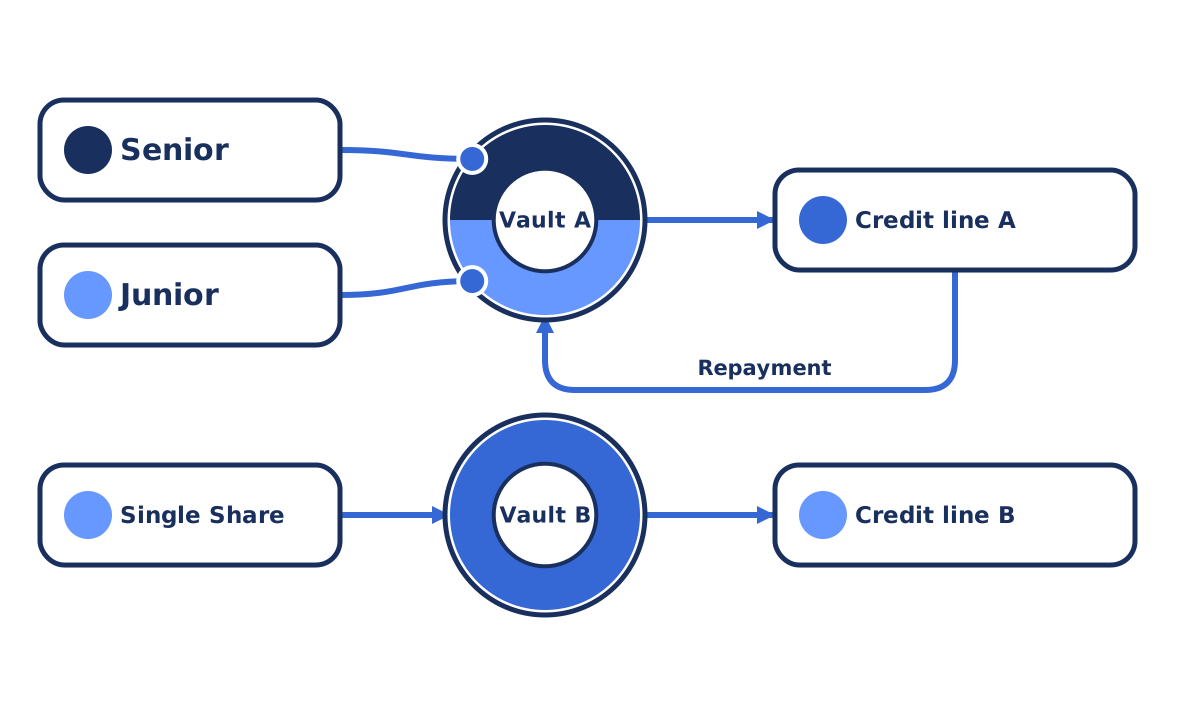
How vault-funded lending works.
See how capital moves from a vault into loans, repayments, and loss allocation, with each outcome attributed to the capital that funded it.
Read guide

Credit recovery rights and responsibilities.
Review recovery authority, investor protections and beneficiary records to understand who can act on impaired credit and receive later proceeds.
Read guide
Channel questions.
Read the documentationSubmit an application through the supported partner manager route. Channel approval and deployment depend on the asset manager’s requirements, configured terms, and the relevant partner permissions.